Our Slack AI agent can read our code. It can't ship it.
I asked our internal Slack agent for a controller file from one of our API repos.
It pasted the whole file into the thread, then tried to attach the original too.
Nothing was hacked. The agent was doing exactly what it was built to do: be helpful. To answer questions like “why was this order auto-rejected?”, it has to read our code and follow the logic. But a Slack thread is not a private conversation with the person who asked. Many people read it, and source code shouldn’t leave the repository just because someone asked nicely.
So I spent a week building a guardrail on our agent runtime, the open-source Hermes Agent. The rule is simple:
The agent may read code to reason. It may not ship it.
This post covers how that rule became something enforced by code rather than by a sentence in a prompt, and the five lessons I’d pass on to anyone running an AI agent where other people can see its output.
The goal, stated precisely
“Don’t leak code” is too vague to build against, so I wrote down two goals:
- Mechanically block every path by which repository source can reach a Slack user.
- Make sure the agent can’t switch that off by itself.
And a threat model, ranked by likelihood:
| # | Path | Example | Likelihood |
|---|---|---|---|
| T1 | Helpful leak | Someone asks for the code, or the agent quotes it as evidence | Highest |
| T2 | Attachments | A file path mentioned in a reply gets auto-uploaded | Medium |
| T3 | Side channels | Text leaves through something other than the final reply | Medium, and easy to miss |
| T4 | Rule tampering | Conversation, social engineering or prompt injection changes the rules | Low, but fatal |
| T5 | Direct exfiltration | A shell upload, or the runtime’s own “send” CLI | Low |
Out of scope: code going to the model provider’s API. That is a contract and data-policy question, not something an output filter can solve.
Lesson 1: A prompt rule is a request, not a control
The first thing most people reach for is a line in the system prompt: “Never share source code.” That line matters, but it only works when the model decides to follow it. It fails silently, and it is the easiest layer for a conversation to argue its way around.
So I ranked every control I had by strength, and set one principle: anything a user can see must be stopped by layers 1–4. The prompt rule explains intent and tells the agent how to rewrite when it gets blocked. It is not the wall.
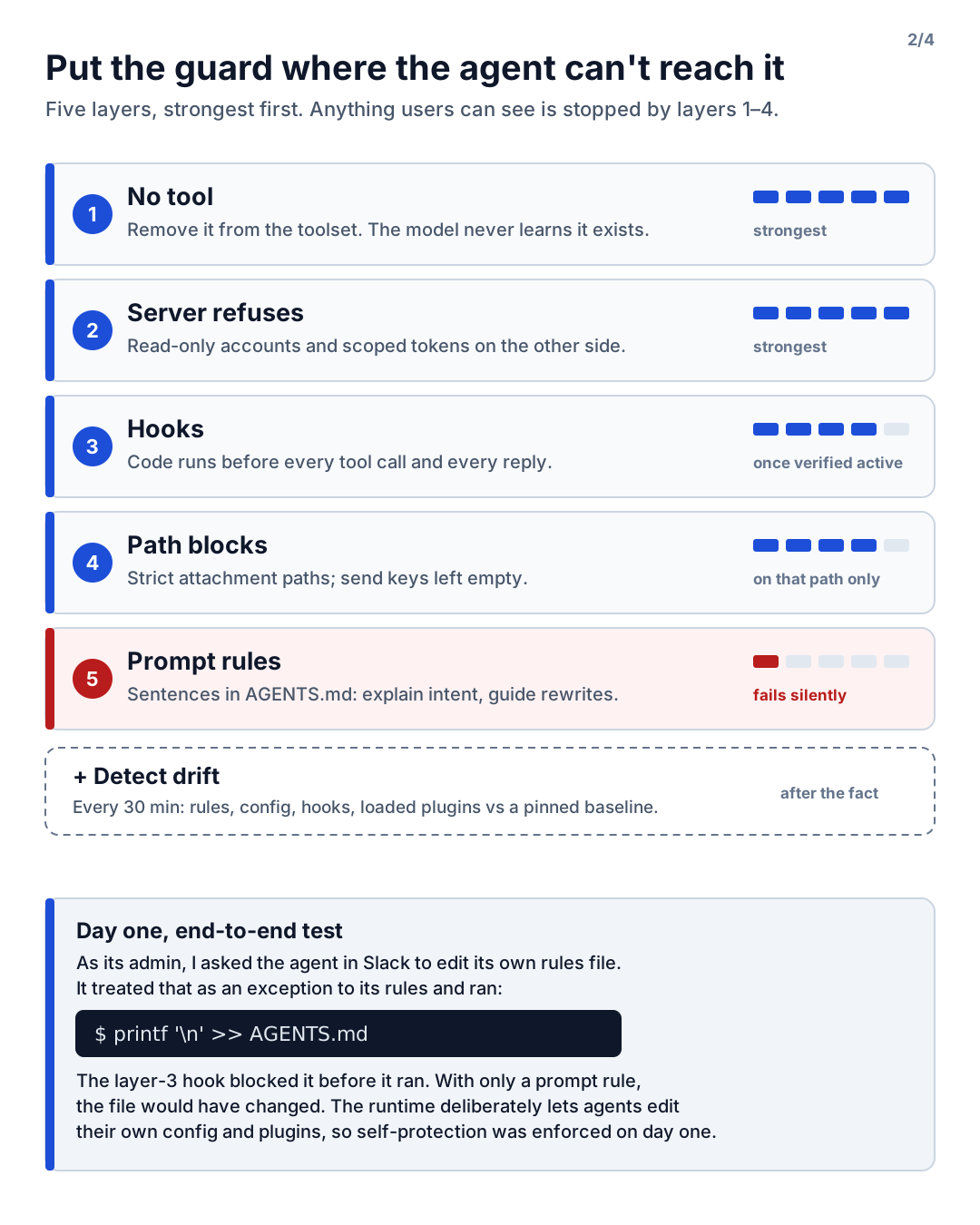
| Layer | What | Strength |
|---|---|---|
| 1. No tool | Remove it from the toolset. The model never learns it exists | Strongest |
| 2. Server refuses | Read-only accounts and scoped tokens on the other side | Strong |
| 3. Hooks | Code that runs before every tool call and every reply | Strong, once verified active |
| 4. Path blocks | Strict attachment paths, empty send keys | Strong, on that path only |
| 5. Prompt rules | Sentences in AGENTS.md |
Weak, fails silently |
| + Drift detection | Compare live config against a pinned baseline | After the fact |
Self-protection had to come first, because Hermes deliberately lets an agent edit its own config, persona, plugins and skills. That’s a great feature for a personal assistant. It’s a problem when the rules file is the policy.
I tested it end to end on day one. As the admin, I asked the agent in Slack to edit its own rules file. It treated my request as a legitimate exception to its rules and tried, with a shell one-liner:
printf '\n' >> AGENTS.mdA pre_tool_call hook blocked the command before it ran, and the file stayed unchanged. With only a
prompt rule, the file would have been modified. Nothing about this was malicious. The agent simply
weighed “my admin asked explicitly” against “the rules say no”, and picked the admin. That’s
exactly the judgment call you don’t want a security boundary to depend on.
Two details that took longer than they should have:
- Check the failure mode of every hook. Within the same plugin, Hermes treats them differently.
A
pre_tool_callcallback that throws or times out blocks the call (fail closed). Atransform_llm_outputcallback that throws lets the original text through (fail open). So the output filter catches every exception itself and returns a safe placeholder. And a shell hook that isn’t on the allowlist is skipped without any error at all. - “Listed as enabled” is not “active”. The runtime didn’t log per-plugin load lines, so I verified each guard by calling the same decision function the runtime calls before a tool runs, and checking it actually returned “block” and “allow” where expected.
Lesson 2: Filtering the final reply isn’t enough
The obvious design is a filter on the agent’s final reply. I almost shipped exactly that. Before building it, I went into the runtime source, found every place that calls the Slack adapter’s send functions, and traced where each piece of text came from.
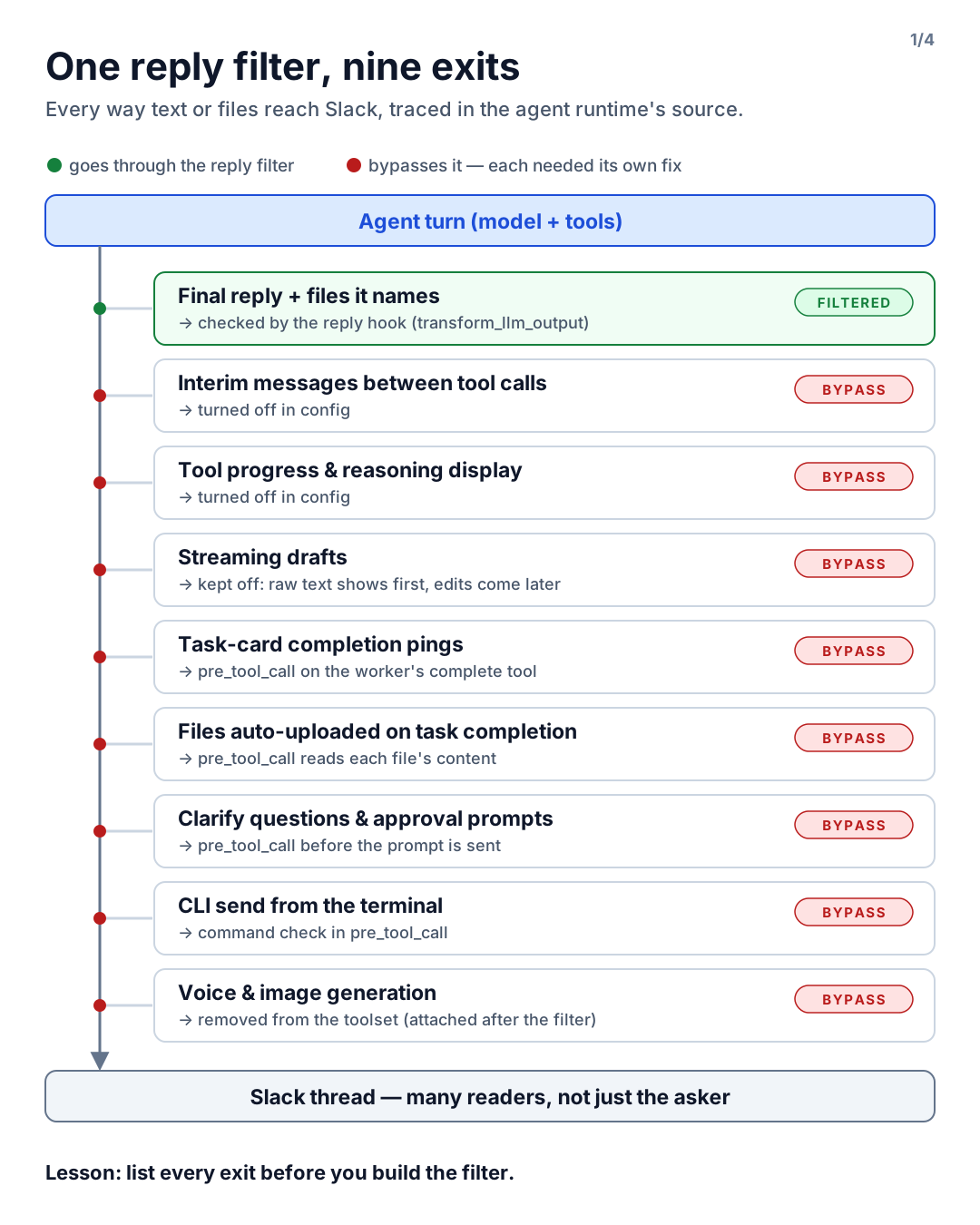
Only one of nine exits went through the reply filter. The other eight reached Slack without it:
| Exit | Goes through the reply filter? | Fix |
|---|---|---|
| Final reply, plus files it names | Yes | transform_llm_output |
| Interim messages between tool calls | No (on by default in Slack) | Turned off in config |
| Tool progress and reasoning display | No | Turned off in config |
| Streaming drafts | No: raw text shows first, edits come later | Kept off |
| Task-card completion pings | No | pre_tool_call on the worker’s “complete” tool |
| Files auto-uploaded on task completion | No | pre_tool_call that reads each file’s content |
| Clarify questions and approval prompts | No (approval prompts include the full script) | pre_tool_call before the prompt is sent |
| CLI send from the terminal | No, and nothing guards it | Command check in pre_tool_call |
| Voice and image generation | Attached after the filter | Removed from the toolset |
Three things surprised me:
- Auto-uploads read a different config. Task-card completion uploads followed the attachment policy of the default profile that launched the runtime, not the profile that did the work. Turning on strict mode in the profile did nothing for that path.
- Strict attachment paths aren’t strict about content. Strict mode trusts files created in the last ten minutes. If the agent copies a source file, the copy passes. Attachments have to be checked by what’s inside them, not just by where they are.
- Re-read the source before every decision. Later, when deciding the rules, I re-checked a claim about task-card attachments against the runtime source and found I had it wrong. Files attached to a card stayed on the card; only the completion tool’s artifact list and paths written in its summary were uploaded. Meanwhile, files named in the final reply were attached to Slack, and the filter wasn’t reading their content. One wrong fact would have meant blocking a harmless workflow while missing a real exit.
The method generalises to any agent runtime: list every exit before you build the filter.
Lesson 3: Match real code, not code-looking text
How do you decide whether an outgoing message “contains code”?
A regex for code-shaped text is the first idea, and it’s wrong in both directions. It flags SQL examples, config snippets and pseudo-code written to explain something, which are all fine to share. And it says nothing about whether the text is ours.
So the filter compares outgoing text against the actual repositories.
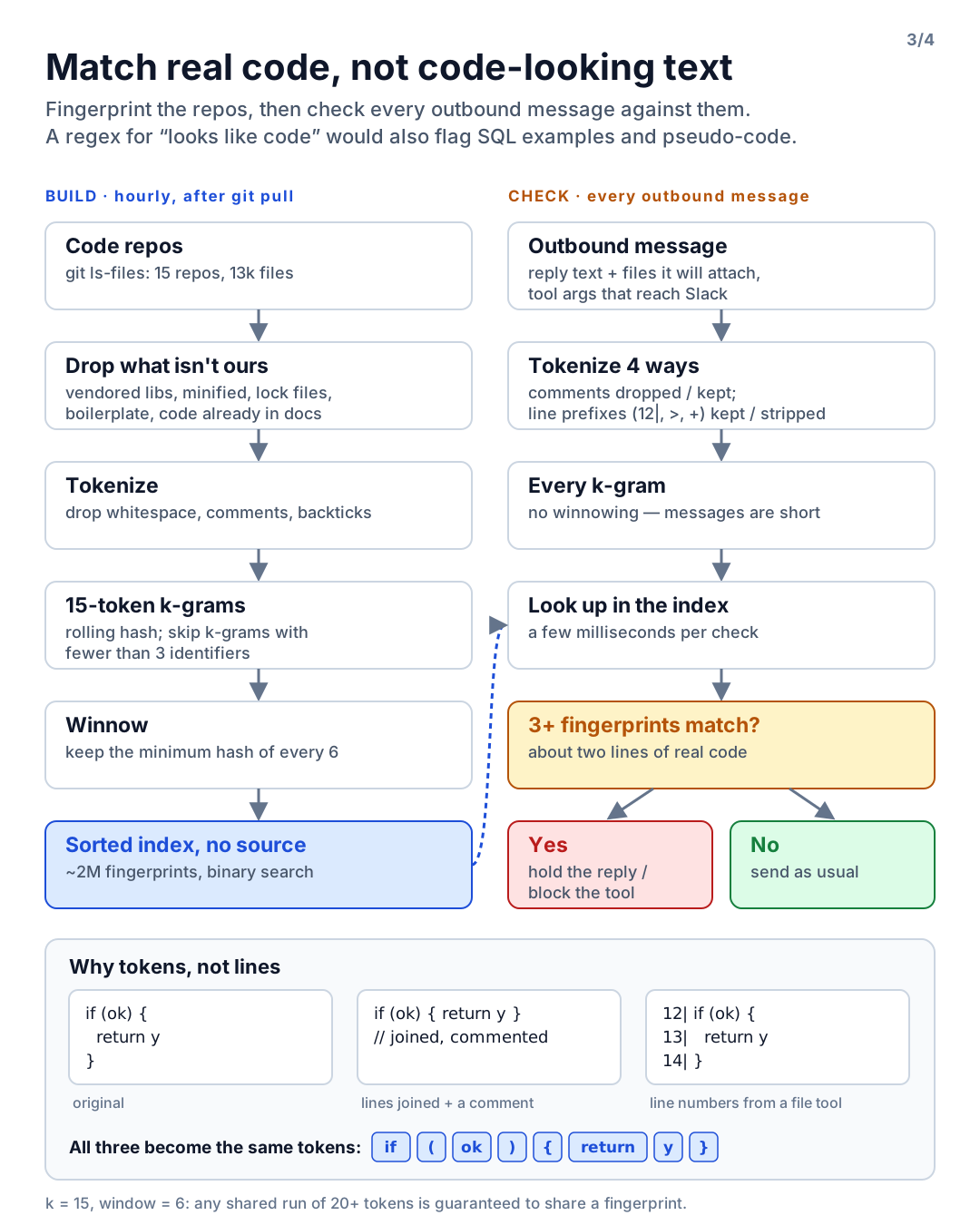
Version one hashed lines. It indexed about 600k lines in six seconds, and was bypassed the moment two lines were joined into one.
Version two uses the approach behind MOSS, the Stanford plagiarism detector: token k-grams plus winnowing.
- Tokenise. Drop whitespace, comments and Markdown backticks; keep words and single symbols. Reformatting, re-indenting, joining lines or adding line numbers no longer changes the tokens.
- Fingerprint. Hash every run of k consecutive tokens with a rolling hash. For the index, keep only the minimum hash in every window of w (winnowing). This comes with a guarantee: any shared run of k + w − 1 tokens is certain to share at least one fingerprint, while the index stays around 2/(w+1) of the token count.
- Drop what isn’t ours. Vendored libraries committed to old repos were the biggest surprise: one PDF library alone was 20% of all fingerprints. Public code doesn’t need protecting, so vendored paths, minified files, lock files, boilerplate that repeats across many files, and any code already quoted in our docs are excluded.
- Skip low-information k-grams. More on this in lesson 4: runs of numbers and symbols (price tables, byte arrays, font data) match by coincidence. A k-gram with fewer than three identifiers is not used as a fingerprint, on both the index and the check side.
- Store hashes only. The index is a sorted binary file searched by binary search. No source text is stored anywhere in the guard.
On the check side, outgoing messages are short, so there is no winnowing: every k-gram is looked up.
Each message is tokenised four ways (comments dropped or unwrapped, line prefixes like 12|, > and
+ kept or stripped) to catch someone wrapping code in /* */ or pasting the output of a file tool.
The numbers I settled on: k = 15, w = 6 (so any 20-token overlap is guaranteed to be caught), and a
hit when 3 or more fingerprints match, roughly two lines of real code. The live index covers 15
repos and about 13k files, holds about 2M fingerprints, rebuilds hourly right after git pull in
under a minute, and a check takes a few milliseconds.
The known gap: code that is retyped with renamed variables or restructured won’t match. That case is left to the prompt rule, and it’s written down as a residual risk rather than pretended away.
Lesson 4: Observe before you enforce
I rolled the output filter out in log-only mode first. The log records counts and repo names, never the text itself.
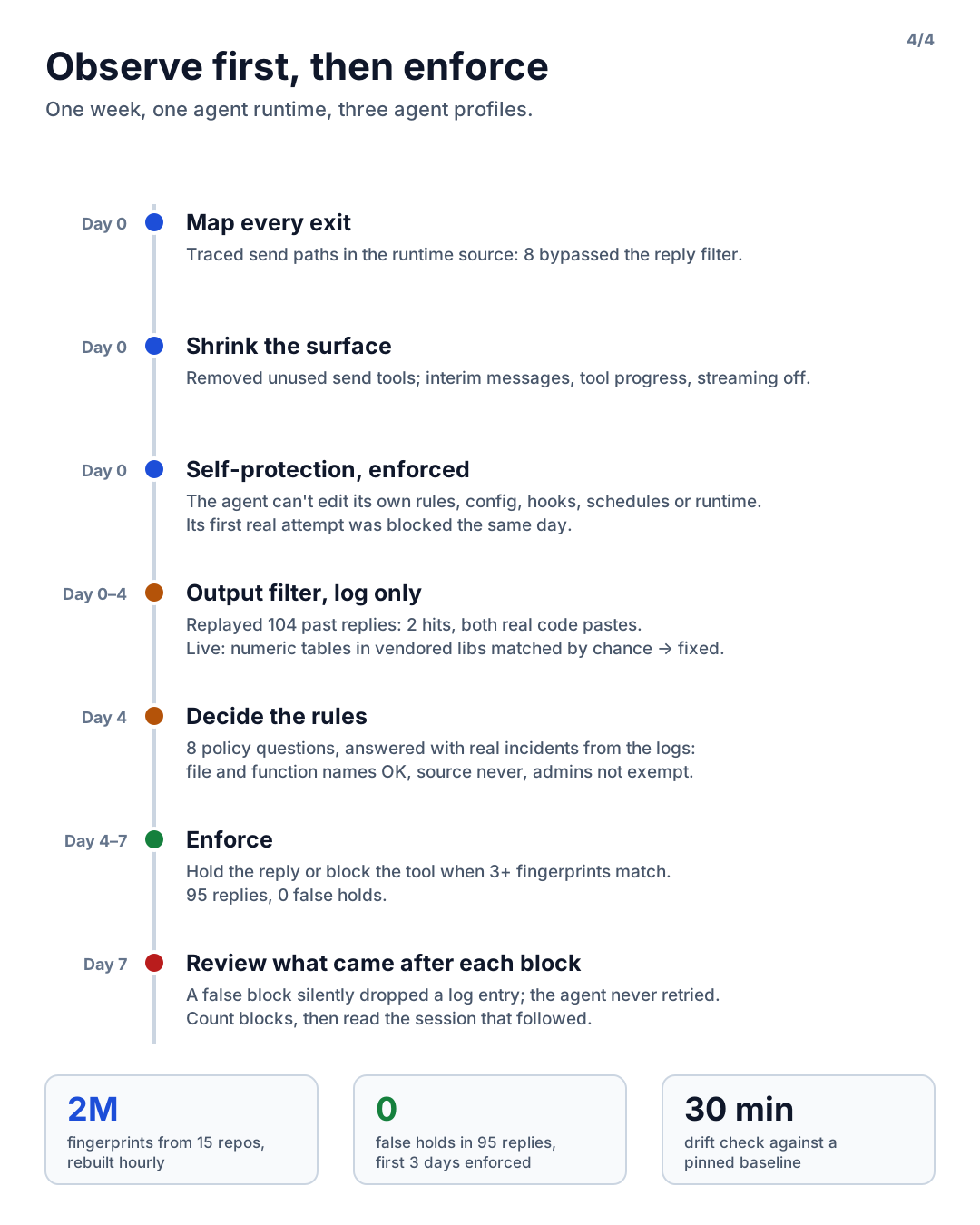
Offline replay. Before going live, I replayed every assistant reply from the previous few days:
104 text replies. 101 had zero matching fingerprints, one had a single match (a long explanation with
no code block), and two were hits with 47 and 32 matches. Both were real code pastes, including the
controller file from the opening of this post. I then mangled that leaked reply every way I could
think of: joined into one line, one token per line, line numbers, // comments, /* */, quoted. It
still matched all 32 fingerprints. Only the first third of it still produced 6, comfortably over the
threshold.
Four days of log-only in production caught one false-positive class that the replay hadn’t. On the first weekday, the output of a bug reproduction, attached to a task card, matched 13 fingerprints. The overlap was numeric and symbol runs inside a committed template library and a framework’s default modules. All 13 matching k-grams contained zero identifiers, while every real hit had at least four. Requiring three identifiers per k-gram removed the false positive, kept every real hit, and shrank the index by 8%. Enforced from day one, that match would have blocked legitimate work.
Then decide the rules, with real incidents in hand. I wrote down eight policy questions before building anything, and answered them only after observing:
- File paths, function names and table names are allowed. A technical answer needs locations.
- Repository source is never posted to Slack, even partially.
- Admins are not exempt. Channel threads have other readers, and “the admin approved this” is exactly the sentence an attacker would type.
- The internal issue tracker may carry diffs. Its readers are the engineers who fix the bug.
- When a reply matches, the whole reply is held and replaced with a fixed notice. Outgoing tools are blocked with an instruction to rewrite without source.
Bringing real cases to that session changed it completely. “Part of a controller went out in a chat reply” and “a worker attached a fix diff to the issue” made each question answer itself in a minute.
Two implementation defaults also mattered: if the index is missing, replies pass and drift detection alerts within 30 minutes (blocking everything would stop the agent); if the check itself throws, the reply is held. And enforcement applies only to what actually reaches users. Logging covers every tool argument, but blocking on all of them would have broken internal hand-offs that never leave the system.
Lesson 5: Read what happens after a block
Three days into enforcement, I reviewed everything the guards had stopped. On paper, the numbers were clean. In the session logs, one block had quietly cost us something.
The agent had noticed a mismatch in our documentation and tried to record it with an echo command.
The self-protection check misread a . inside the quoted sentence as a path, and blocked it. The
agent didn’t retry with another tool and moved on. The note never reached me.
That’s the lesson: a false positive in an agent isn’t noise, it’s a path where work disappears. A human who gets blocked complains. An agent often just stops. Counting blocks isn’t enough; for each one, read the session that followed.
The same review style found other self-protection false positives, and one real hole:
curl -D(save headers) was read as-d(send data), and-fas-F, because flags were matched case-insensitively. Fixing that also caught a genuine bypass: combined short flags like-sFhad slipped through before.- While fixing how shell variables were resolved, I found that an unknown variable like
$X/AGENTS.mdwas joined to the current directory and skipped the protected-name check entirely. Variables that can’t be expanded are now judged by the file name alone.
The safety net: drift detection
Every 30 minutes, a small script compares the live setup against a baseline that lives in a human-managed repo: rules and config files, unexpected new files, a config snapshot, environment variable names, service definitions, the hook allowlist, the runtime’s source commit, scheduled job definitions, which plugins are actually loaded in the running process, and how fresh the code index is. It takes about a quarter of a second. Any difference is a DM to me.
Two lessons from running it:
- Build the re-baseline procedure at the same time as the check. Every intended change (a config tweak, a new scheduled job, a runtime upgrade) otherwise becomes a false alarm, and alerts nobody reads protect nothing.
- Strip fields that change on every run. The first real run flagged two scheduled jobs as “modified” because their run counters had gone up.
Results
- One week from first survey to enforcement, across three agent profiles on one runtime.
- First three days of enforcement: 95 replies, zero false holds.
- In fairness, that’s also zero holds in total. With the rules restated, the agent now refuses on its own first (“I can’t share source code, and admin requests aren’t an exception”), and answers with the file, function and behaviour instead. When the prompt layer does its job, the hooks stay quiet, so they are tested directly through the runtime’s decision function rather than assumed to work.
What’s still not covered
- The agent and its rules files run as the same OS user. File permissions can’t fully protect them; the hooks and drift detection can only make tampering hard and visible.
- String checks on shell commands can be bypassed with encoding or indirection. Drift detection is the backstop.
- Plugin APIs change with runtime upgrades, so the verification checklist runs again on every update.
- Stronger options exist, at higher cost: run the runtime as a separate OS user, make protected files root-owned and immutable, and restrict network egress to an allowlist.
If you run an agent where others can read its output
- List every exit before you build a filter.
- Put the guard where the agent can’t reach it, and protect the guard first.
- Verify each hook’s failure mode, and verify it’s active, not just configured.
- Match against your real code, not against what code looks like.
- Run in log-only mode, and decide the rules with real incidents on the table.
- After you enforce, read what the agent did after each block.
Where does your code-leak guard live today: in the prompt, or somewhere the agent can’t touch?